An HTML page is a collection of elements surrounded with opening and closing tags, i.e., of markers that open and close elements; opening tags are of the form <tag-name>, while closing ones are </tag-name>. The content of the element is whatever we put between the tags. For example, the following is an element; it starts with the opening tag <p> and ends with the closing tag </p>; the tags tell us that the element is a paragraph; the content of the element is what we find between the opening and closing tags, i.e., the sentence ‘Hello World!’:
<p>Hello World!</p>
In html we are not required to indent elements (to leave spaces before the opening tag), but if we don’t indent them, the structure of the page becomes difficult to follow.
The following is an initial HTML template of a valid but mostly empty web page (download):
<!DOCTYPE html>
<html lang="en-US">
    <head>
        <meta charset="UTF-8" />
        <link rel="stylesheet" type="text/css" href="style.css" />
        <script src="script.js"></script>
        <title>My first HTML page</title>
    </head>

    <body>
        <p>Hello World!</p>
    </body>
</html>
This is a Link to a working version of our template; we can see the code that the browser is running by right-clicking on the page and selecting ‘view/show page source’.
Now let’s see the elements of our template; don’t worry about understanding each of them; we will go over the ones that are important later. Let’s number the lines of code to have a reference:
 1 <!DOCTYPE html>
 2 <html lang="en-US">
 3     <head>
 4         <meta charset="UTF-8" />
 5         <link rel="stylesheet" type="text/css" href="style.css" />
 6         <script src="script.js"></script>
 7         <title>My first HTML page</title>
 8     </head>
 9
10     <body>
11         <p>Hello World!</p>
12     </body>
13 </html>
The following are the line-by-line instructions that we are passing to our browser:
1: this is an HTML document, not ‘text’ or ‘pdf’ or something else
2: open the document and, by the way, assume that we wrote it in American English (we use an opening tag)
3: open the header of the document (we use an opening tag), where we put general info to help the browser to display our page correctly
4: use Unicode char via UTF-8 encoding (1-to-4 bytes)
5: placeholder for yet-to-be-written CSS style sheet, that we will call ‘style.css’
6: placeholder for yet-to-be-written Javascript script page, that we will call ‘script.js’
7: the title of the page; it will appear in the title bar of the browser
8: we finished the header info so close the header of the document (we use a closing tag)
9: optional vertical space to separate visually the header information from the body information
10: open the ‘body’, where we will put the content of the page that the browser will display (we use an opening tag)
11: create a paragraph with the text ‘Hello, World!’
12: we finished the content, so close the ‘body’ (we use a closing tag)
13: we finished our document, so close it (we use a closing tag)
We nested each element inside another, without overlaps, e.g., the ‘head’ and ‘body’ are nested inside the ‘html’ element; once we open the ‘head’, we cannot open the ‘body’ until after we close the ‘head’. Likewise, the ‘meta’, ‘link’, ‘script’ and ‘title’ elements are all nested in the ‘head’, and a paragraph ‘p’ is nested in the ‘body’; this paragraph has the content of our page, i.e., the string ‘Hello World!’.
Some elements, like ‘meta’ and ‘link’ are ‘self-closing’, i.e., their tags open and close immediately. They have the form <tag-name />. The closing tag of a few elements is optional, e.g., a paragraph element closes with either a </p> tag, or with a carriage return, so the </p> tag is optional.
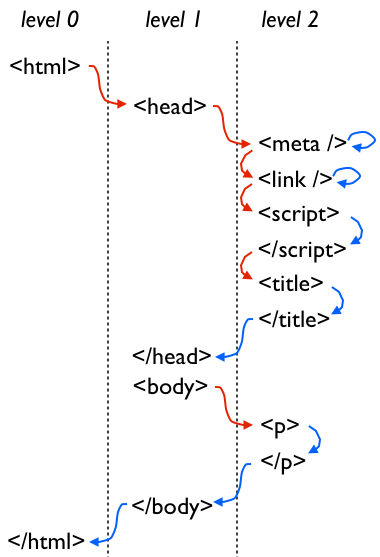
children of an element don’t overlap each other
Our template in action looks like this: Our template displayed in a browser. Click on the image to go to the working page
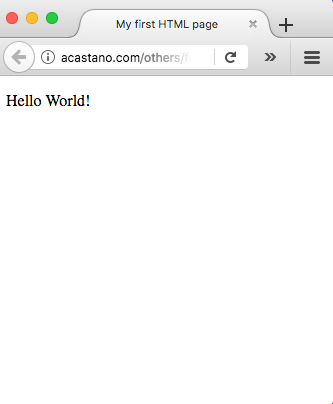
The webpage loads fine in spite that lines 5 and 6 point to style and script files that don’t exist. HTML looks for these files but since it cannot find them (because we have not created them yet), it simply ignores them.